A conversation could begin without a photograph.
A shy person could first speak under a nickname, without pressure or a mandatory photo. As trust grew, people could choose to share photographs privately and move to audio or video calls.
The story of its creation · January—July 2026
StrawberryChatIt did not begin as a large platform. It began with a few ordinary fields on a simple website running on a local computer. In half a year, that small idea grew into a place for meeting people, private conversations, shared activities and everyday life with friends.
We have done everything we can to protect your data, and we keep improving that protection as the chat develops.
There was only a local page and a wish to make something useful for people who wanted to meet.
A shy person could first speak under a nickname, without pressure or a mandatory photo. As trust grew, people could choose to share photographs privately and move to audio or video calls.
Friend invitations, acceptance, removal, ignoring and protection from unwanted contact all had to work together without confusing anyone. That difficult work shaped a central principle: each person controls their own circle of communication.
While the chat was being developed, its bright white screen disturbed people sleeping nearby in the same room. Night mode was created for calmer evening conversations. Later, backgrounds and the colours of panels, buttons and messages also became customisable.
The wish was not merely to send a link, but to watch a film together, feel as close as possible across a distance and talk while watching. That human need became shared online viewing.
How the chat became more convenient, stable and safe for people.
The first “hello” messages lived on localhost alongside a dream of putting the chat on the internet. The next prototype already had sign-in and registration, interest rooms, people online, voice messages and the first emoji.
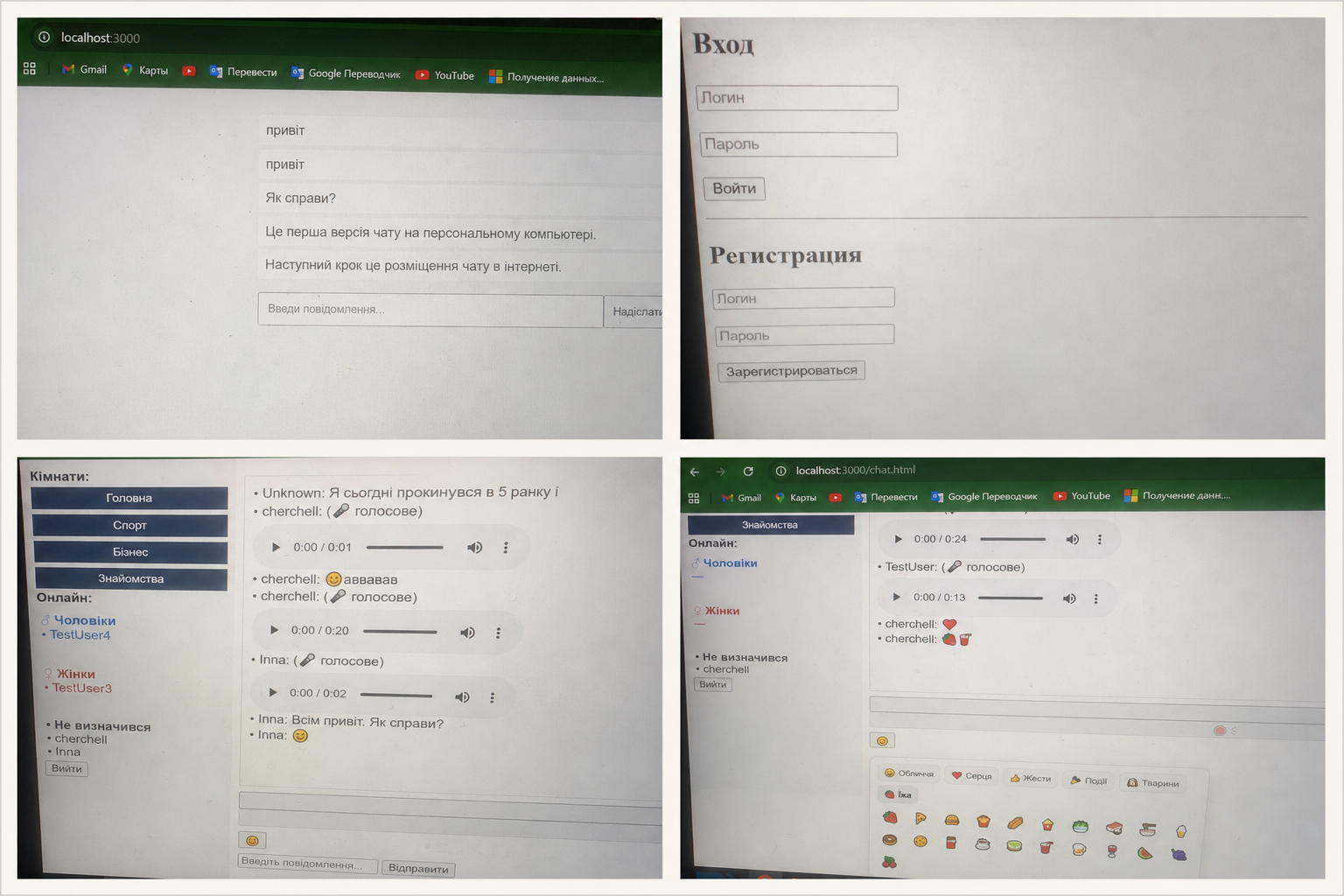
On 12 February, the first stable StrawberryChat opened with a public room and private conversations. Sign-in and accounts were strengthened to give future features a reliable foundation.
One of the hardest stages was completing Friends and Ignore so that invitations, acceptance, removal and unwanted-contact limits all worked together and stayed understandable.
Several major updates were released during April. Work continued on reliability, photographs, video, files, a personal space and activities that people could share.
The Windows app, installable web app and QR invitations arrived alongside My Room, recording to YouTube, shared watching and chat appearance settings.
My Room gained screen recording for lessons, with a webcam circle over the recording and automatic upload straight to YouTube. Profile photo review got smarter -- an AI now checks against the actual appearance rules, not only explicit content, and the moderation team sees the same photo queue from private chats and profiles in one place. The Android app answers calls more reliably, and missed calls no longer disappear after a page refresh.
The biggest work of September was an honest, detail-by-detail review of private end-to-end encryption: friends' live location moved from plain text to full encryption, clear ways to never lose your key appeared (a password backup, a recovery code, PIN protection), and a lost or revoked device can now be safely "forgotten" without leaving old access behind. Voice messages in private chats are finally heard on the first try, on any device. Private dialogs no longer jump on their own while you're reading a conversation, and the private tab always opens to the list, not a random chat. YouTube videos from My Room now detect when to become Shorts automatically, their title and description can be edited right from the chat, and YouTube links shared in the general rooms open as a tidy embedded card instead of a link to someone else's channel.
Features grew from ordinary wishes: to feel closer, lose nothing important, develop yourself and share life with friends.
Electronic books from different drives and devices can be organised by shelves and topics, opened in different formats, read aloud and used to continue reading from where you stopped. Friends can see what you are reading.
Favourite websites and YouTube recordings can be arranged on themed shelves. A video resumes from the saved minute with its sound settings; either the video or a useful link can be shared privately.
A personal notebook keeps thoughts and plans. People can build courses, take photographs directly to Google Drive and record video directly to their YouTube channel.
A sports tracker supports workouts with a favourite playlist, progress and shared results. A personal break timer reminds you to rest for a chosen number of minutes and return with fresh energy.
People can invite someone on a date, organise a group outing, track personal finances and investments, and—with permission—see where friends are.
Public rooms support voice. Private conversations support screen recording and sharing with an audio call, private groups, group video calls and recordings of those calls.
Profiles, favourites, interest compatibility and random video calls in the dating room help people find someone with whom they have something real to discuss. Film trailers can be shared with personal descriptions.
The travel room offers airlines, hotels and bus companies. Telegram can connect to StrawberryChat, while supported devices can use face recognition for sign-in.
A birthday cake can be posted, cut into slices and shared with friends. The chat can show a device type, user ratings and the Fruit Garden game for rule breakers. A private panel can have its own password.
It is not only about protection: it helps people meet, talk, form groups and spend time together.
Choose a room by topic, see active people, write publicly or begin a private conversation.
Text, photos, video, voice messages, files and calls are supported, with participant roles and posting controls in groups.
A personal space for photos, recorded video, books, notes, events and other materials.
People can watch video together, discuss films and books, share workout progress and discover common interests.
Day and night modes, backgrounds and colours make the space comfortable for each person.
StrawberryChat works in a browser, installs on a phone as a web app and has a separate Windows application.
Clear everyday rules for protecting communication.
Private messages and attachments are encrypted on participants’ devices. Only participants on their authorised devices can read them; StrawberryChat stores and transfers encrypted data.
A new device can be approved with a QR code from a device you already trust. Connected devices can be reviewed and revoked.
We help protect the account during sign-in, passwords are not stored as readable text, and important protection is checked after updates.
Protecting data is continuous work.
New features are checked and important parts are tested again after changes.
StrawberryChat employees do not have keys for reading private conversations. Operational access is limited to what support and service operation require.
You decide whom to add, whom to answer, which groups to join and which devices remain connected.
We monitor how the service works, correct problems that are found and continue improving the ways data is protected.
StrawberryChat continues to develop communication, personal possibilities and data protection with every update.